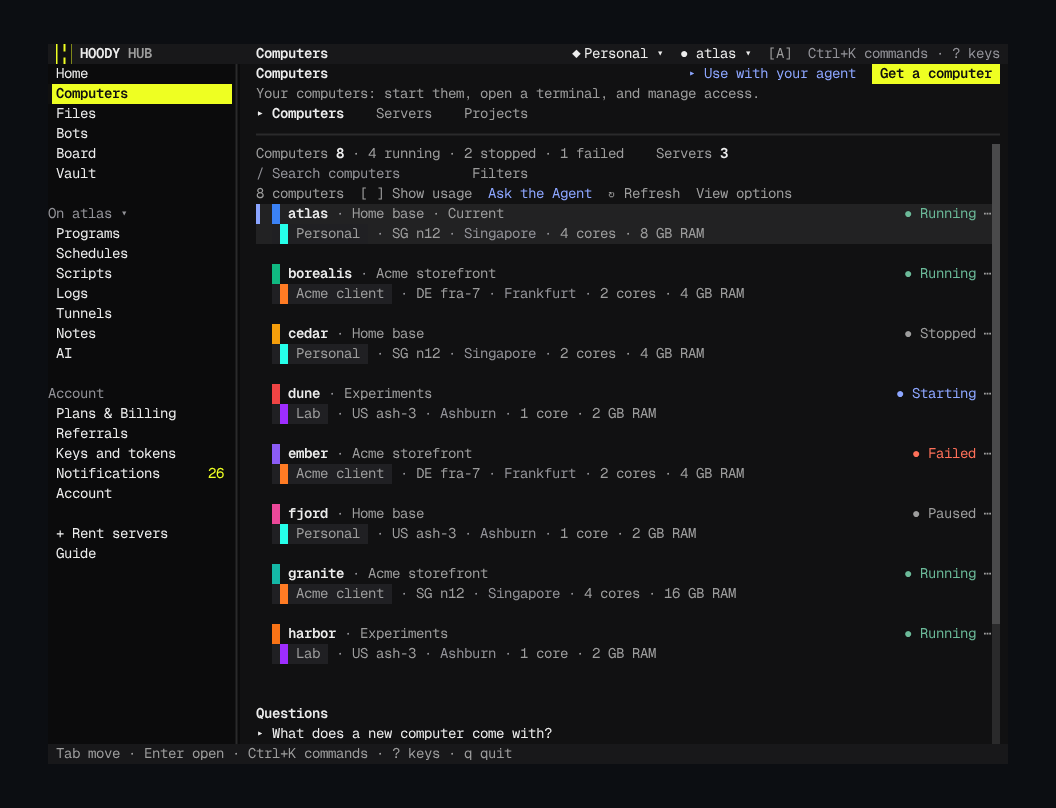
The Hub is where you run the 100x Foundation: computers, servers, Bots, AI, files and scripts in one app. Rent a server from one checkout drawer, open any computer's terminal or desktop in a tab, and share a realm with a link that ends on its own.
Done. dev-box is running. Want me to open its terminal?
Hoody API
hub.hoody.com/computers
Computers
atlas4 cores, 8 GBRunning
borealis2 cores, 4 GBRunning
dev-box2 cores, 4 GBStartingRunning
It works from any AI:
Hoody AI, built in
ChatGPT
Claude
Gemini
Perplexity
Your coding agent
Paste this into your AI@https://hoody.com Connect to Hoody
Or ask a Hoody Bot over HTTPhttps://<label>.hoody.bot
Or run it yourselfhoody computers list
Give each agent its own key with an end date. A few account and payment steps need you to sign in yourself.
hoody / hub / anywhere
02 / Three ways in
Open it anywhere.
One Hub in three forms. Each one signs in to the same account and shows the same computers.
Same account, three forms
Terminal
The Hub, as text.
Type ssh hoody.com in any terminal and the Hub opens right there: the same pages, drawn in text cells. Nothing to install, on any machine with ssh. Move with Tab and Enter, jump with Ctrl+K, quit with q.
ssh hoody.com
Have the hoody CLI? hoody hub opens the same Hub.
ada@laptop: ~$ssh hoody.com
Browser
Any browser, any screen.
Go to hub.hoody.com and sign in. Nothing to install. On a phone the menu moves to the bottom and every page still works.
hub.hoody.com
One file
The whole Hub in one HTML file.
Every release of the Hoody SDK ships hoody-hub.html with its checksum. Open it from disk or from your own HTTPS site, and sign in to Hoody.
hoody-hub.htmlsha256 3f9a…sha256 b71c…sha256 e04d…sha256 ✓file:///hoody-hub.htmlSign in to Hoodyhoody.comSign in
Fonts, styles and scripts are inside the file. It carries no code from other sites.
Opened from disk, it keeps your sign-in in memory only.
Payments open in your Hoody Hub online.
That is just the Hub. You can also run all of Hoody from:
ChatGPT
Claude
Gemini
Perplexity
Claude Code
Codex
Cursor
Your agents
Telegram
Slack
Discord
Voice
Phones
Any terminal
The hoody CLI
TypeScript SDK
HTTP API
Agent Skill
Your apps
IoT devices
hoody / hub / open source
03 / Open source
Open source. Yours to change.
The Hub is open source under the Apache 2.0 license. Ask your coding agent for the change you want: it edits the source, rebuilds the one file, and you open your own Hub.
Pick a plan or a machinePlus, Pro, or bare metal by country, cores, memory, disk and price.
Confirm purchaseOne drawer shows the quote. Pay from your wallet, and add funds by card or crypto.
Hoody sets up your serverThe host, the network and the disk encryption. Nothing to install.
Get a computerName it and pick the server. A full Linux machine with the Kit inside.
Open its programsTerminal, desktop, files, browser and agent, each at its own link.
What you never touch
A provider account
An operating system install
Network setup
Security and kernel updates
hoody / hub / deploy
05 / Deploy
From nothing to a live URL.
Run a program on a port, start an app from GitHub, or describe a script in plain words. Then give it your own domain and choose who gets in.
Four ways to go live
Programnode server.jsPort 3000 · restarts on crash · or 1 copy per port, up to 4096
AppAny GitHub repoThe agent reads the README · or Nix · pkgx · AppImage · Docker
Script/webhook5 ready-made or 18 assistant ideas · checked TypeScript
Tunnellaptop :3000A laptop app online · no outside service
Alias + own domainHTTPS
app.example.com→my-shop-k7q2
One CNAME record · HTTPS on the first visit
Who can openSame at your domain
Anyone with the addressOnly my IPOnly people or keys I pickPrivate
Password or key link · a firewall in front of every port
https://app.example.com
Online
Live behind your rules.
Web tabKey linkPut on Board
Programs and port rangesEvery web port a program listens on gets an address. Run one copy per port across up to 4096 ports, restarted after a crash.
Apps from any repoPaste a GitHub address and the agent reads the README, installs the app and starts it. Or find one in Nix, pkgx, AppImage, Docker and more.
Your domain, your rulesOne CNAME record and HTTPS comes on the first visit. Open it to anyone with the address, only your IP, people or keys you pick, or no one.
Scripts and tunnelsDescribe a script and the assistant writes it in TypeScript, checked on your computer before it goes live. A tunnel puts a laptop app online with no outside service.
hoody / hub / realms
06 / Realms
One account, split into realms.
Make a free realm per client, project or experiment. Share it with a link that ends on its own. Your wallet and vault stay yours.
Never included
Wallet, billing and rentalsKept
Making keys or reading your vaultKept
Your other realmsKept
Your email and sign-in historyKept
PersonalatlasPersonal only
borealisIn 2 realms · no copy
Client · AcmestagingRunning
Share
Share realm1 Choose · 2 Review
Work on computers7 days
Reaches borealis, staging and computers added later.
Sign-in linkThey confirm firstQR codePrompt for an agent
Pause, edit or stop it any time
Free, and never copiedA realm costs nothing. One computer can sit in several realms without a copy. Each realm keeps its own vault entries, Bots and Boards.
Share in two stepsPick a role and 1, 7 or 30 days, or a date up to a year away. Each right says if it costs money, can outlast the share or can show secrets.
Keys that cannot widenAn API key limited to realms can never be widened to all realms. Give it chosen rights, an end date and allowed IPs.
One stop per realmOne button stops AI agent work in a realm on the selected computer: chats, background tasks and agent shell jobs. Check the result for work still running. Queued messages may start afterwards. Other realms keep running.
Lock a secret with a password and your browser encrypts it before it is sent. The CLI, SDK and agent read the same form.
No networkRead-only512 MB256 processes
A sandbox per program
Cut a program off the network, make its files read-only, and cap its memory and processes.
ComputerExit502
Choose where traffic leaves
Route a computer's traffic out through a SOCKS5 or HTTP exit. If the exit drops, requests stop with a 502 rather than leave from the computer's own IP.
Branch from a snapshot
Restore a snapshot, or start a new computer from it. Folder backups download as a .zip, straight from the computer.
Open a computer as a network drive on your PC. Connect S3, SFTP, Google Drive, Dropbox and 7 more services as folders on the computer.
github.com/owner/repoRunning
Paste a repo, get an app
Pick a starter app or search app catalogs, or paste a GitHub address. The agent on your computer installs and starts it.
0 9 * * 1Mon 09:00 computer time · 17:00 your time$2.00Stopped · cost limit reached
Every schedule, one list
Cron jobs, scripts, web requests and agent loops, each with its next run in the computer's time and yours. An agent loop stops at the cost or time limit you set.
Live · 3 watching
Broadcast a Board
Share a Board as live video. Anyone with the link can watch until you stop, and stopping turns the link off.
A payment holds a lock before it is sent, so a second tab or a reload never sends it twice.
hoody / start
hoody / start
Start free, in one line.
Free to start with no card: Hoody AI is built in, and the AI you already use works too.
<script src="https://cdn.jsdelivr.net/npm/hoody-sdk/dist/hoody-sdk.browser.min.js"></script>Exposes window.HoodySDK. Pin a version for production, and give pages short-lived scoped tokens.
The building blocks, in plain English. Your AI combines them into countless more. Open a line for its link and what to say to your AI. Every row on one page
Hoody Chatbot
Powered by Hoody Chatbot
Answers come from the FAQ and capability index. No messages leave this page.
hoody / our story
From privacy to agentic infrastructure
We started with privacy.
Per-app VPNs, browsing containers that beat fingerprinting, SOCKS5 proxies. 20 people, $3.2M raised. The lesson: real privacy needs full isolation, so containers.
We started building with AI.
A model in a loop with end-to-end tests: write, test, fail, fix, repeat. Every core system was built this way.
Agents running agents.
Verification chains across repositories, and an anonymous AI gateway, because inference deserves privacy too.